How to Effectively Manage a Fully Remote BIM Team
Leading a fully remote, multicultural BIM team requires striking the right balance between flexibility and productivity, while keeping up with tight deadlines and high client demands.
How do you foster engagement, motivation, and alignment with company vision and business goals in a virtual team, all through nothing but a flat screen?
If you're among the lucky few who won’t be setting foot in an office anytime soon, I’m sure you understand that having the right tools and strategies in place for clear communication is crucial.
In this series of articles, I’ll share some communication techniques and frameworks that help me lead a remote Scan to BIM team that thrives in unpredictability, where priorities shift daily and new projects land on our desks with very little notice.

Image generated with ChatGPT
Let’s cut to the chase! The focus of these articles is clear communication and effective management at every level, which is how I’ve structured the series:
Part 1 - Leading the Managers – This part focuses on ensuring business operations run smoothly while remaining aligned with company goals.
Part 2 - Leading the Team – How to empower each team member to deliver high-quality results on time, fostering a cohesive and high-performing remote team.
Part 3 - Leading the Project – Driving success by optimizing communication and ensuring smooth execution across all BIM projects.
Spoiler alert: this series is essentially about meetings. It boils down to how we communicate and which tools help us do it effectively. Without further ado, let’s jump into Part 1!
Leading the Managers
Managers are the driving force of the team, which is why I refer to them as the core team. Their responsibilities include keeping operations running smoothly, ensuring projects are delivered, and clients happy. At the same time, they foster company culture and values, support team development, and help push business goals forward.
They essentially keep the engine running, and as a business unit leader, my top priority is to provide them with the guidance, support, and resources they need to succeed and help others succeed. This is what I start my Mondays with! The challenge? Making sure all of this fits into a one-hour meeting.
On Mondays, I hold a group session with the leaders (project managers). This is where we align as a team and set our goals for the week—and it’s the meeting I lead. My goal is to keep these calls as strategic and high-level as possible. On Wednesdays, I hold separate one-on-one meetings with each of them to dive deeper, address any blockers, and ensure the goals we set on Monday are on track. These are the meetings they lead, so they have the flexibility to structure them as needed.
For the rest of the week, we rely on on-demand calls when needed and use Microsoft Teams for ongoing communication. This approach helps us keep internal meetings to the bare minimum and make good use of everyone’s time, allowing us to stay flexible and responsive.
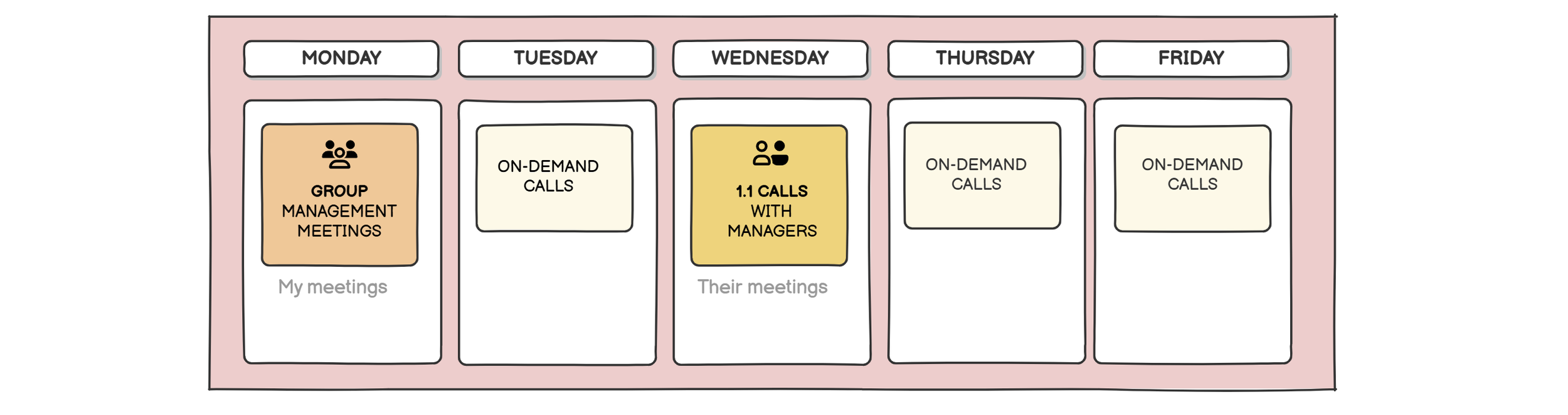
Meeting schedule strategy
Our Monday Weekly Meeting
Let’s dive deeper into our main weekly event, the manager’s weekly meeting. The purpose of this meeting is to ensure alignment and set the right direction for the week ahead. We use this time to discuss key topics, including:
Workload & Resources – Do we have sufficient capacity? Should we reallocate team members? Do we need to recruit additional people?
Project Status – Are all projects on track? Is there anything requiring immediate attention?
Team Well-Being – How is everyone doing? Are there any internal issues that need to be addressed? Is it feedback season?
Upcoming Opportunities – Is there any surge we should prepare for? Who will be leading those projects?
Sales Support – Are there any estimates we owe to the sales team?
Internal Initiatives – Are we making progress? Are there any obstacles that need to be addressed?
And the list goes on... Once again, how do you pack all of this into a one-hour meeting? How do you keep everyone engaged? In essence, these types of meetings should be designed with purpose, and this is how I design mine:
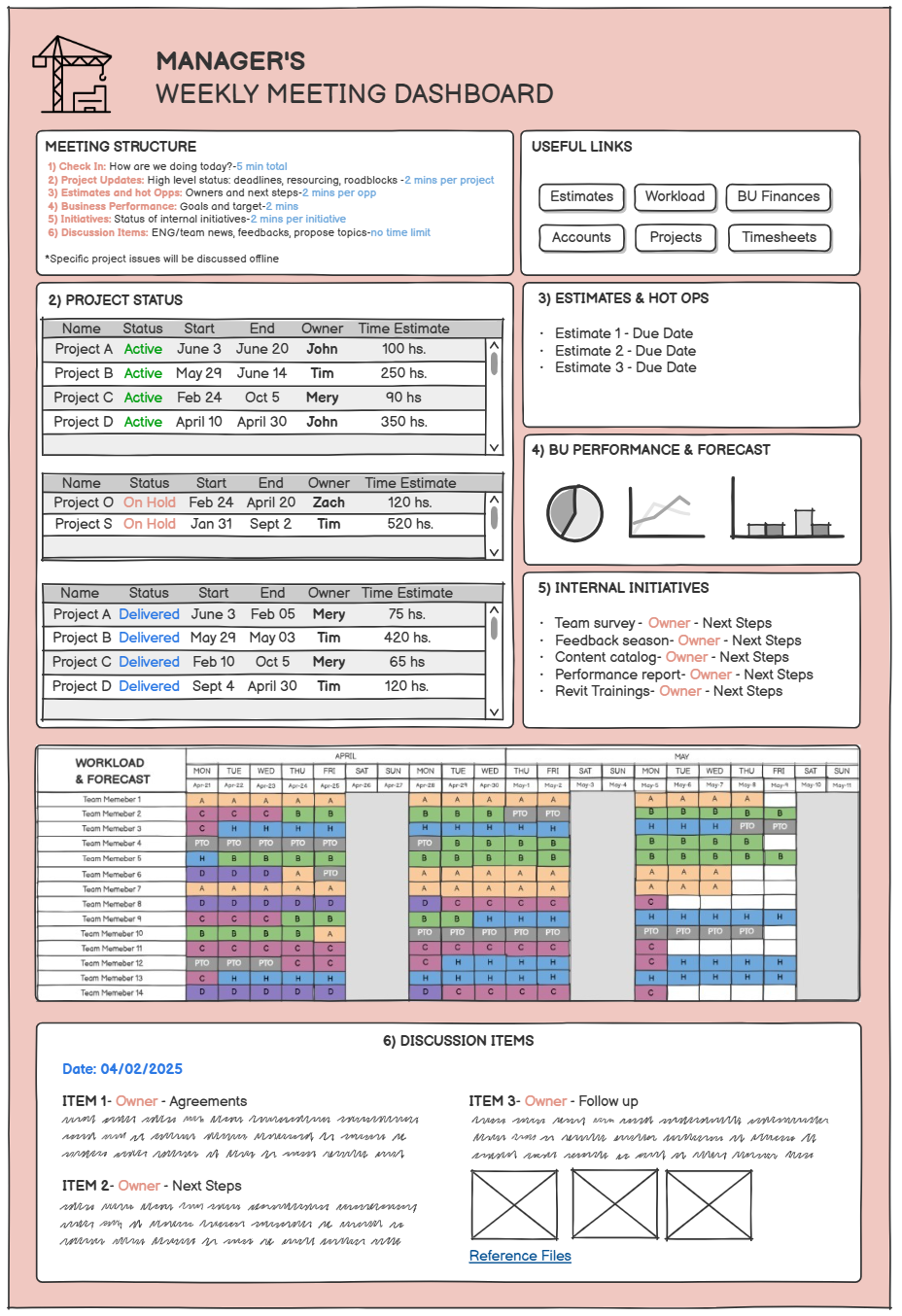
Weekly meeting dashboard framework
Let me introduce our Weekly Meeting Dashboard. We use ClickUp, a project management tool that helps us organize tasks, documents, and workflows in one place. With ClickUp Dashboards, we pull information directly from our projects and keep everything up to date. It also gives us the flexibility to add text notes, links, and images as needed.
Our Meeting Dashboard is everything we need to run the meeting. It enables us to link project reports, add quick links, and integrate documents from various formats—like Excel. As our single source of truth, this dashboard is low-maintenance and only takes about five minutes before the meeting to refresh interactive items and load any new discussion topics.
Now that we’ve covered the basics, let’s dive deeper into the components of the meeting:
The Meeting Structure
The structure of the meeting must be clearly understood by all participants to ensure everyone’s expectations are aligned. Assigning time limits to each section helps maintain a high-level conversation and keeps the focus on key priorities. It’s also crucial to clarify which topics are purely informative and which are open for discussion, to avoid drifting off track.
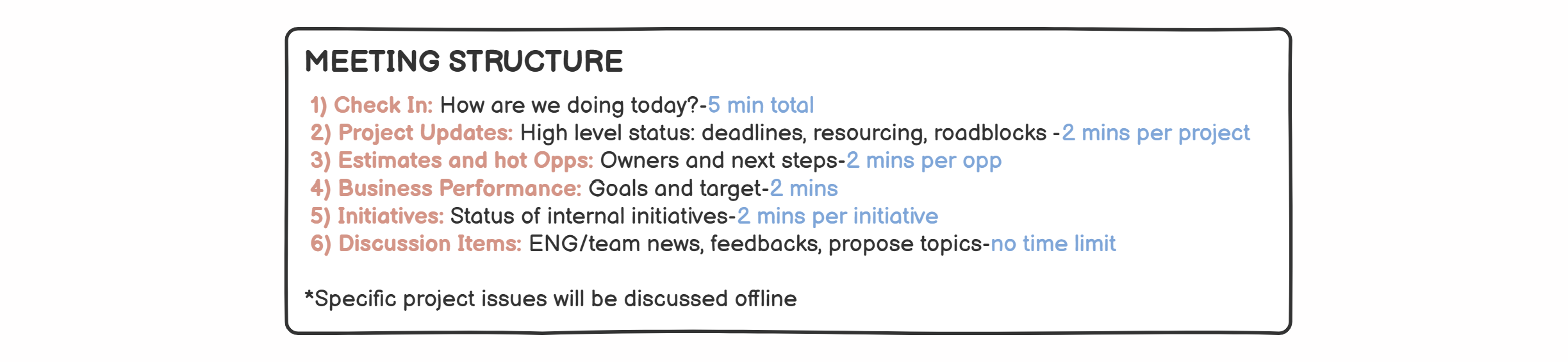
Meeting structure and rules
Here are the key sections of our meeting:
1. Check-In
We always start with a quick check-in to connect as a team and set the tone for the meeting. It doesn’t need to be long—just a moment to share how we’re feeling, highlight anything personal or professional that might affect the week, and get everyone engaged from the start. This simple step helps foster connection and encourages a collaborative mindset.
2. Project Updates and Resourcing
In this section, each manager gives a quick update on their active projects, highlighting key milestones, blockers, or anything that requires team input. The idea is to surface what matters most, with project-specific details saved for Wednesday’s one-on-ones.
As we go through updates, we reference our Resourcing Map, a simple Excel file that project leads can access and update regularly. This dynamic and collaborative tool shifts daily, and Excel allows us to stay agile, moving resources around as needed to cover project demands efficiently. This framework gives us a complete picture of the team’s availability, enabling us to stay flexible and effectively forecast the upcoming workload.
The Resourcing Map also includes key details like upcoming PTO, country holidays, and project needs. We aim to keep the current week as accurate as possible to ensure everyone stays busy. Project leads are responsible for maintaining the data of the current week, while managers focus on the weeks ahead, as they typically have more visibility. We strive to forecast as much as possible so we’re ready to reallocate any team member finishing a project or running out of work, avoiding last-minute scrambles.
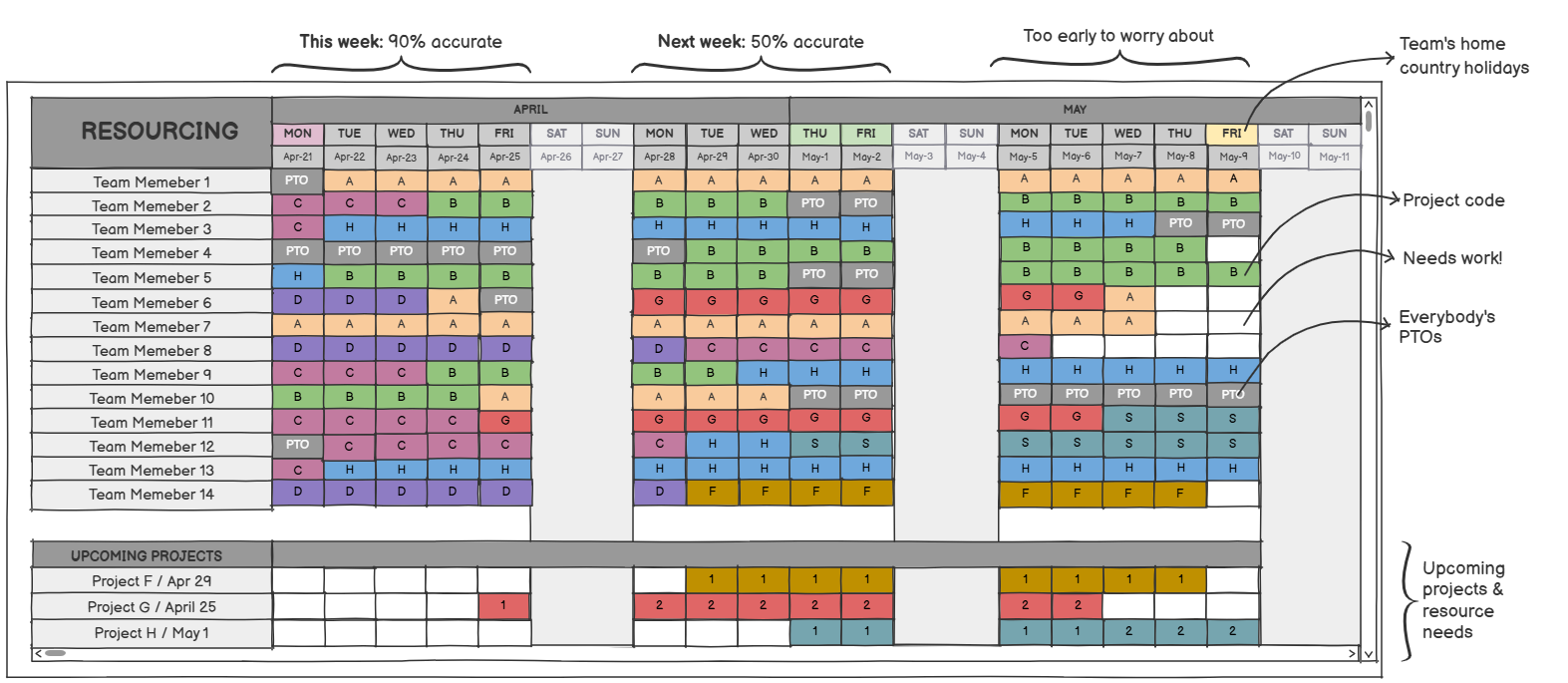
Our Resourcing Map
3. Estimates & Hot Opportunities
In this part of the meeting, we review any pending estimates or high-priority opportunities carried over from the previous week. We check on ownership, discuss the approach, reassign estimates if necessary, and ensure nothing slips through the cracks.
We also discuss high-probability opportunities worth following up on with our sales team. Bringing these hot opportunities into the conversation increases visibility and helps us stay prepared for what might come next.
4. Business Performance
We take a high-level look at performance indicators and key financial metrics like revenue, margins, and project profitability. This helps the team understand where we stand as a business unit and where adjustments may be necessary.
5. Internal Initiatives
Continuous improvement takes center stage here and drives our success, making us the A team. We check in on ongoing internal projects like tool enhancements, templates, or process documentation. These can easily be deprioritized during busy weeks, so we use this time to reinforce ownership and keep the momentum going.
6. Discussion Items
We wrap up with open discussion topics that require input, decisions, or creative problem-solving. This is the most dynamic part of the meeting and often where collaboration truly shines.
Discussion items are the most human-centric part of the meeting, where managers bring questions and feedback from their team members, ensuring voices across the team are heard. We talk openly about what’s not working, reflect on communication gaps, and explore ways to improve. It’s a transparent environment built on trust, where the goal isn’t to point fingers but to propose solutions and grow as a team.
If we run out of time, we move the conversation to a follow-up call with the appropriate people or defer the topic to the following week.
Final Thoughts
Managing people is never easy, especially in a fully remote setup where we miss out on casual chats by the coffee machine or after-office meetups. Nowadays, we’re bombarded with calls and meetings, making it harder than ever to stay focused, connected, and intentional with our time. That’s why it’s so important to structure meetings thoughtfully.
Here are a few simple yet powerful tips that have been invaluable to me in running and moderating productive, engaging sessions:
Preparation: Arrive fully prepared, with a clear understanding of what you want to achieve.
Focus: Keep the conversation high-level and identify topics that need deeper discussion, reserving them for a separate call with the appropriate audience.
Time Expectations: Set time limits for topics that are more informative than discussion-driven.
Engage People: Ask open-ended questions to encourage commitment and motivate participation for the topics that need input or discussion. Questions like "How would you solve this?" or "What do you propose to achieve this?" Involving people in the solution always helps create empowerment.
Responsible Individuals: Assign an owner to each action item to ensure accountability.
The reality capture industry is inherently dynamic, and things rarely go exactly as planned. In this fast-paced virtual environment, clear and consistent communication becomes essential, not just for alignment, but for enabling teams to navigate uncertainty together. Regular check-ins and open dialogue help promote transparency, creating a safe space where both wins and mistakes can be shared without fear.
Trust plays a central role in this process. When people trust their peers and leaders, they feel empowered to act quickly and adapt as a group to shifting project demands.
Leading remotely adds many layers of complexity and, above all, requires empathy, especially when you can’t gauge emotions or reactions through a screen. Take the time to listen actively. Sometimes, the most powerful thing you can do as a leader is to create space for others to speak up and feel heard.